
Our hyperfocused fursuit head idea was started with a simple idea to make a simple head with just digital animated eyes escalated very quick, and now I’m thinking about a handmade VR glasses with an Android phone. Yeah, it’s pretty crazy already but I can experiment it right?
My first thought is to get the idea of Google Cardboard VR. If you don’t know, when all the VR crazy race started, we had the Oculus creating the Oculus Rift using a high resolution screen and some lenses arrangement to get our brains do the crazy stereoscopy stuff inside it. And using sensors like accelerometers, gyroscope and magnetometer (compass) we can get a precise information about position and rotation of the device. We get all this sensor data to navigate in a 3D world and divide the image of this world for both eyes through the screen and these lenses and… we get an immersive sense of being on this 3D world!
While later this breakthrough on Virtual Reality, Google create a concept you can make your own device with an Android phone (also an iPhone), a bunch of cardboards and a pair of specific lenses. Using some technics like barrel distortion on a screen divided in half rendering the same scene twice, feeding our player rotation on a 3D world game by phone sensors (the same I told you above) we can have the same WOW effect made by Oculus Rift with pretty less resources! Of course things escalated, Oculus was brought by Facebook which is now Meta, the founder of Oculus “descending to madness” and Google Cardboard turning Daydream, ditched some time later and revived as an open-source project called Google Cardboard VR, supported only by Unity by now (and by greedy companies who sells on Epic Marketplace for Unreal Engine). Now we have excelent devices, the power-fuelled by gamer expensive PC GPUs like Valve Index and HTC Vive or the little brother Meta Quest which is pretty awesome for AR stuff (augmented reality)!!! No, I will not comment Apple Vision because it doesn’t worth mention here!!!
Less nerdy history and more nerdy action, my idea was not only build a VR device by hand, but a AR device, it means I need to see the outside world by the VR device. And here is a thing that can decide if I will end up with a pretty fursuit head (and a very tech one) or will ditch this project and thing about doing something with this head…
But Frank, why are you thinking that way? Because, if I even built successfully a VR device with camera streaming directly in front my eyes, I will face the stereoscopic calibration of two images slightly different (considering the view angle, resolution and distance of cameras) and even successfully calibration the two cameras I might face that little discomfort caused by my beautiful feedback system which I emphasized before on previous article. If all goes well, I will have a system I will be proud, but if we get dizzy by just use the head for a few minutes, there is a no go for the design!!!
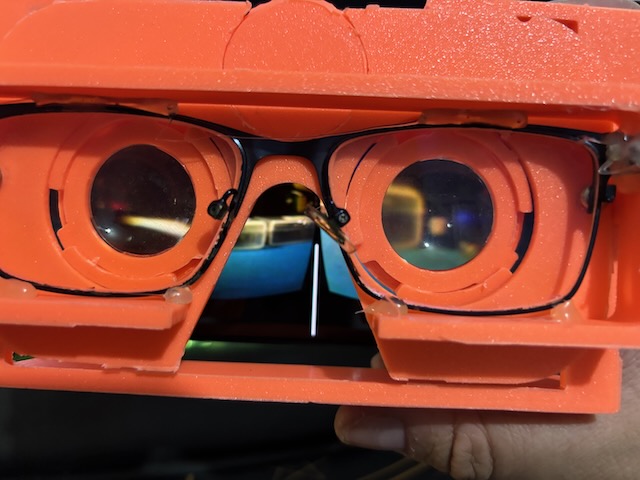
Ok, so lets do some initial experiments about this crazy idea!!! First thing I need was a simple design for my VR device. I don’t have cardboard available to cut and fold, but I have a 3D print and some PLA spools. Also, I’ve found pretty easy a pair of lenses they specify on the project page (just a pair of small lenses with 45mm focal distance, I’ve choose the 35mm diameter because was first I’ve found here). But I needed at least a 3D model guide to make my own. So, thingiverse for the win again and I’ve found this model. I know it’s not the best model and I’m sure we have better models out there somewhere but the beauty of this model is it has a great lenses system, simple and adjustable. And the best part, the lens system is all split in different models!!! Perfect for me to get only the lens parts and done the rest in Fusion. Here are some pics of my initial prototype for a small device which can be placed inside my fursuit head.


Yep, as you might know, we are making an optical device, so the vision impaired people like this fox need some prescription lenses above the device lenses. Time to put in action my old glasses (inspiration for this patched glasses from my profile picture). These glasses are so patched it was barely holding on my face but now I’ll get a good use to it!!! Time to print all those parts and…


Above we have all parts put together, my Asus ROG Phone 5s which I’m really thinking not using it on the final design because… its an Asus ROG Phone!!!! Configured a new profile for Google Cardboard using the same pupilar distance (60mm) and same device-lens distance. And finally testing with official app.
Ok, now we need to make an app to show our images, right? Well I’m a game developer not professionally but I’ve have a degree on game design, development and art, yep, officially college degree besides my math bachelor. And I was a high level initiated on the Unity art of game development, but after that I’ve being corrupted by the Unreal Engine dark arts!!! Done all my little professional season of game developer using Unreal and all my hobby furry games I’ve started (and might never finish) was done in Unreal, so my first thought was doing a game on it. The fact is, after Google ditch daydream and kinda abandon the cardboard project, Epic stop its support on Unreal. The official plugin was drag almost dead in all lifecycle of Unreal Engine 4 and appeared in the first Unreal Engine 5 preview, but it vanished on release. The solution we have is by a very thoughtful company which build a plugin from the official open-source Google Cardboard VR SDK and they are just asking a small tip of $299 for this simple plugin. They are very good company indeed!!!
But at least I’ve tried downloading the last supported Unreal 4 version which runs like a shit on my M1 Mac (only Unreal 5 has native support for ARM) and you know, things not work as I needed. The solution was came back and confess my sins for the Unity lords and download it again!!!
Back to Unity I’ve setup a sample game using the plugin with ease but the basic setup for all VR development is: same camera, same view for both eyes. But as I’m thinking, I pretty sure I still need two cameras and each one streaming directly on its respective eye, right (and left hihi)? So, need to figure out how can I stream the cameras to Unity app in a reasonable way (with minimum latency) and show a different camera on each eye. But these two things are just like a forbidden art on Unity VR development. Speaking of different content for each eye, this is a pretty no no for the masters of VR on OpenXR group because they just need to show same content for both eyes and the very fancy and expensive device do the rest for you, also, who need to develop your own AR system, the fancy device do this for you. Yep, open standard groups are kind mean sometimes. And, to be complied with the OpenXR group and also to match easily with new Unity render system, the Google Cardboard VR must disable the different render on cameras, also, it don’t use single-pass shaders so we cannot get the eye index directly on shader because apparently on multi-pass render we cannot get which eye is rendering on that pass (just supposing here because I didn’t find any plausible explanation for this). One thing I’ve found to help this was got back for Unity built-in render pipeline (legacy which means it can be deprecated at any time now) so we can set on Camera Render which eye it will render. Ok, two cameras with two different textures being rendered, I can just render the physical camera on a plane and show it to game camera but we will get only part of the plane and it will be a hell to configure the camera’s frustum (we cannot use orthographic camera in VR). How to solve it? Use a component script implement the OnRenderImage method and do a Graphics.Blit. I know you might not understanding anything I’m saying but in sum I’ve just put a component on camera and use a trick to replace the image the camera is seeing by other texture, done the same thing I could do directly on shader but using a component on a camera.
Ok, I passed the first barrier, now to the physical cameras. For this I’ve think simple, use a low power device with WiFi and with a small camera. Luckily we have a bunch of devices with that profile, the most common is the ESP32-CAM. It is a pretty small device, low power consumption powered by an ESP32 SoC (System on a Chip) pretty common in the maker world. It can be programmed using C++ but it is compatible with Arduino ecosystem. So my first attempt was get two of them, burn a very basic web server streaming on it (getting http basic image streaming). Plug both boards on a battery board giving reliable 5V and spacing them 60mm (our pupilar distance). But things are not that easy right? How can I stream those cameras to Unity game? We have here another Unity forbidden art because people don’t wanna stream video to your game, they just wanna stream out from their game. We have lots os examples dealing with how to stream your game but almost anything for stream in the game. The protocol for both cases, in general is using the WebRTC (Web Real Time Communication), a two-way protocol to stream media in general (audio, video and text) for lots of clients of for few, using a peer to peer communication (I have the media and send to you directly if you ask me). Ok, lets do the nerd stuff by myself here. To start of, I need to process my cameras output and ideally send them in one stream offer. I cannot do this on a ESP32 device because I will need to use an image processing library (OpenCV) and just only this can kill our ESP32 CPU time (it will hang or throw an error). Think about it!!! Dealing with images is just linear algebra, I mean, a bunch of matrix calculations and ESP32 tiny processor can’t have this firepower to handle it. So, I’ve get one of my Raspiberry PI’s laying around and put it to work. Make a simple python code to join the two streams and send via WebRTC using the vidgear lib. This lib do all the dirty WebRTC handshaking mumble-jumble for me and I just need to create a custom class to stream my video data. The problem was the Unity part because I didn’t know anything about WebRTC communication because this thing came from javascript to run directly on browser and have a very dark magic on a low level programming behind the scene. What I was doing is entering the dark portal directly without calling it in a ritual, I mean, I was creating all the handshake mechanics by hand on a low level language (at least lower than javascript).
The handshake process is quite straightforward. You have the media, so you are ready to offer it if anyone asks. If someone need it, it make an offer and send to you. You answer the offer telling they you are ready to send the data and tell where are you in the network. They receive your answer and set internally in their protocols they made an offer (their local descriptor) and get an answer (their remote descriptor). On your side you have a list of remote descriptors to send their your data. Easy right? But it is not documented anywhere how can be made on Unity. Just a bunch of sample scripts doing a very dark mumble-jumble. So I get a lot of time understanding and doing some tests. Finally I’ve got a successful handshake and save the video on a Render Target on Unity, than I’ve used this Render Target, a simple shader to get only half of it for each eye and I’m done!!!


That’s nice. First tryout is done with a very dirty and ugly code I’m ashamed of showing here. Now it’s time to clean up things, put everything on a Git Repo and starting mounting on my fursuit head. But let’s leave this is for another post!!!
